
Is a Speaker Cleaner App Safe? What Can Actually Damage Your Speaker
Is a speaker cleaner app safe? Yes — 165–230 Hz tones at normal max volume stay inside a phone speaker's design range. Here's what can actually cause damage.
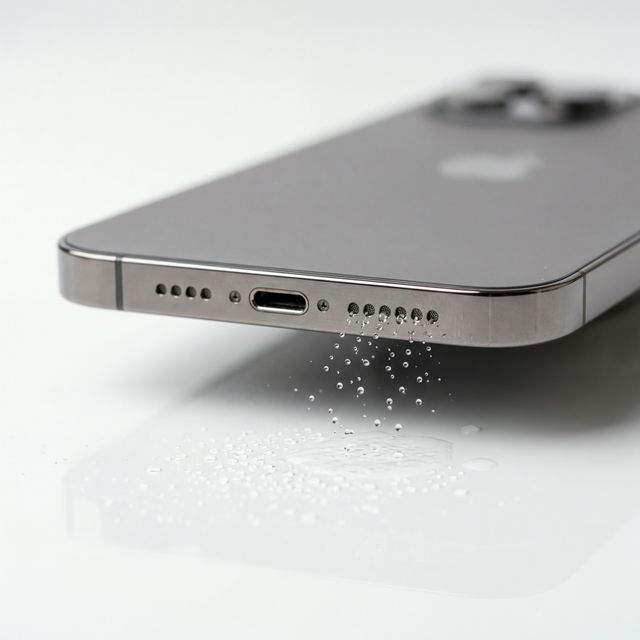
Yes, a speaker cleaner is safe for a normal phone speaker when it is used the way it is meant to be used: a low-frequency tone (165–230 Hz), speaker facing down, at your phone’s normal maximum volume, for 30–60 seconds at a time. Those frequencies sit inside the range your speaker already plays every day in music, ringtones and videos. What can cause problems is not the tone itself but how and where it is played — on earbuds that are still in your ears, on a powerful external speaker cranked to the limit, for hours on end, or on a speaker that is already broken.
This guide covers the real risks, how to tell a legit speaker cleaner app from a shady one, and a simple checklist so you can clean your speaker with confidence.
Why Low-Frequency Cleaning Tones Are Within Your Speaker’s Design Range
A phone speaker is a tiny driver: a thin diaphragm moved by a voice coil, sitting behind a mesh grille. It is designed to reproduce sound from the low hundreds of hertz up to the high frequencies of speech and music, at whatever level your phone’s own volume limit allows.
A speaker cleaner does not push the hardware beyond that. It plays a tone in the 165–230 Hz band — the low end of what a phone speaker can comfortably reproduce — so the diaphragm moves with a relatively large stroke. That movement creates the pressure pulses that push water droplets, dust and lint out of the grille. (We explain the physics in detail in Does Speaker Cleaner Actually Work? What the Science Says.)
Three things keep this safe on a phone:
- Your phone sets the ceiling. “Max volume” means the maximum your phone’s amplifier allows, not some extra power the website or app unlocks. Many modern phones also use a smart amplifier that limits excursion and heat to protect the speaker.
- The frequency is ordinary. 165–230 Hz is bass-to-low-midrange content found in almost every song. It is neither ultrasonic nor sub-bass.
- The cycle is short. A 30–60 second cycle, repeated two or three times if needed, is far less demanding than an hour of loud music.
What Can Actually Damage a Speaker
Here is an honest list of the situations where caution makes sense.
| Situation | Risk | What to do |
|---|---|---|
| Earbuds or headphones still in your ears | Loud tones close to the eardrum can harm your hearing | Take them out first; clean earbuds lying on a table |
| External, Bluetooth or hi-fi speaker at full power | A continuous tone delivers more steady power than music and can overheat a voice coil | Start at moderate volume, keep cycles short, stop if you hear distortion |
| Looping the tone for many minutes or hours | Unnecessary heat and wear, with no extra cleaning benefit | Run 30–60 s cycles, pause between them, stop after 2–3 |
| Speaker that is already torn or blown | Loud tones can worsen a damaged diaphragm | If it crackles even at low volume, stop and get it checked |
| Poking pins, needles or compressed air into the grille | The most common way people puncture a speaker | Use sound plus a soft, dry brush — never sharp objects |
Sub-bass on a small speaker: inaudible, not dangerous
If you play a very low frequency (say 40–60 Hz) on a phone, you may hear almost nothing, or just a faint buzz. That is not a sign of damage — a tiny driver simply cannot move enough air to reproduce deep bass audibly. It is also not useful for cleaning. Stick to the 165–230 Hz band, and if you hear rattling or harsh distortion at any frequency, lower the volume.
What a speaker cleaner cannot fix
A speaker cleaner only clears what is trapped in the grille: water droplets, dust and pocket lint. It does not repair internal water damage, corrosion, a disconnected voice coil or a blown speaker. If you are unsure which problem you have, read Dust Accumulation vs. Blown Speaker — How to Tell the Difference.
Privacy and Permissions: Web Tool vs. Apps
Safety is also about your data. The free online Speaker Cleaner runs entirely in your browser using the standard Web Audio API. There is nothing to install, and it does not ask for microphone, location, contacts or storage access — it only plays sound through your speaker.
Our companion app, Speaker Wizard, adds one-tap cleaning and haptic vibration. Whichever cleaner app you choose, check its store listing before installing: the App Store privacy label and the Google Play “Data safety” section show what data an app collects.
How to Spot a Shady Speaker Cleaner App
A legit speaker cleaner app is simple: it plays sound. Be wary of apps that show these warning signs:
- Permissions that make no sense. A tone player has no reason to need your contacts, location, SMS or call logs.
- Impossible frequency claims. You may see apps and videos promising “50000 Hz” or even “speaker cleaner 50000000000hz”. Phone audio is normally limited to roughly 20–24 kHz, human hearing tops out around 20 kHz, and very high frequencies move the diaphragm far less than low ones — so they would not clean better even if a phone could play them. Numbers like these are marketing, not acoustics.
- Ads that block the tool. Full-screen ads that appear mid-cycle, or a cleaning button that only works after watching several ads.
- Pressure to pay for “deep cleaning”. The method is the same low-frequency tone either way.
- Claims to fix water damage or “repair” a broken speaker. No sound can reverse corrosion or replace a damaged part.
Safe-Use Checklist
- Remove earbuds and headphones from your ears before playing any cleaning tone.
- Remove any case or cover that blocks the speaker opening.
- Place the phone speaker facing down so gravity helps.
- Set your phone to its normal max volume — there is no need for third-party “volume booster” apps.
- Run one 30–60 second cycle with the Speaker Cleaner or the Water Eject tool.
- Wipe away anything that comes out, then repeat up to 2–3 cycles if needed.
- Check the result. After a cleaning cycle, the site now plays a short test sound and asks how your speaker sounds, so you can confirm the improvement right away. For a full check of both channels, use the Speaker Test.
When to Stop and Seek Repair
Stop using cleaning tones and contact the manufacturer or a repair shop if:
- The speaker crackles, pops or buzzes even at low volume
- There is no sound at all from one speaker
- Sound does not improve after three cycles and a gentle dry brushing
- The phone was submerged for a long time, or you see green or white corrosion
- Your phone shows a liquid-detected warning on the charging port (see our guide on iPhone not charging after water exposure)
FAQ
Is the Speaker Cleaner app legit?
Yes. It uses a well-understood acoustic effect — low-frequency vibration pushing water and debris out of the grille — the same idea behind Apple Watch’s Water Lock ejection. It is honest about its limits: it clears the grille, it does not fix hardware.
Can a speaker cleaner damage my speaker?
On a healthy phone speaker used at normal max volume for 30–60 second cycles, no. Damage risk comes from misuse: earbuds in your ears, external speakers at full power for long periods, endless looping, or a speaker that is already broken.
Is it safe to use a speaker cleaner every day?
Yes. Short cycles are no harder on your speaker than playing music. Most people only need it after a splash or when the sound starts to muffle.
Do I need to install anything?
No. The web tool works in any modern browser on iPhone, Samsung, Pixel and other Android phones without installation or special permissions.
The Bottom Line
A speaker cleaner is safe when you use it as intended: 165–230 Hz, speaker facing down, normal max volume, short cycles, and nothing in your ears. Be skeptical of apps that ask for unrelated permissions or promise impossible “50000 Hz” frequencies, and stop if your speaker crackles at low volume — that is a hardware problem, not something sound can clean away.