
How to Clean Dust from Your Phone Speaker — The Complete Guide
Got a dusty, muffled phone speaker? Use our free phone speaker cleaner online tool and a 165-230 Hz tone to push dust out in 30–60 seconds.
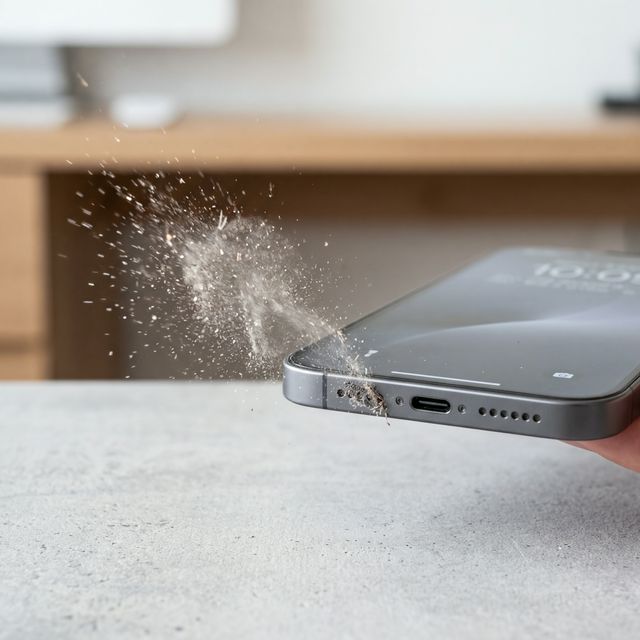
Got a muffled phone speaker? Here’s the fastest fix: play a low-frequency tone between 165 Hz and 230 Hz through your speaker for 30 to 60 seconds while holding the phone speaker-side down. The sound waves create pressure pulses that physically push dust, lint, and pocket debris out of the speaker grille. You can do this instantly with Speaker Cleaner’s free phone speaker cleaner online tool — no app download required.
Whether it’s pocket lint on your iPhone or dust buildup on your Samsung Galaxy, obstructed speaker grilles are almost always the reason your audio suddenly sounds muffled, tinny, or distorted. If you’re looking for a clean speaker online method or a free phone speaker cleaner, this is the fastest place to start. The good news is that in the vast majority of cases, the fix takes under a minute.
Why Dust Gets Trapped in Phone Speakers
Modern smartphones use tiny speaker grilles with microscopic holes — typically between 0.1 mm and 0.3 mm in diameter. These holes are small enough that fine dust, clothing lint, and normal environmental debris effortlessly accumulate inside them, even when you mostly keep your phone in a pocket or purse. Add a little bit of ambient moisture or sweat, and the dust turns into a compacted layer.
The speaker diaphragm sits just behind these holes. When dust blocks the grille, the diaphragm still vibrates to produce sound, but the dust layer absorbs and distorts the sound waves before they reach your ears. That’s why dirty speakers sound muffled rather than completely silent.
Common Ways Debris Enters Phone Speakers
Dust can enter your phone’s speaker system through everyday situations:
- Pocket lint — The number one cause of speaker clogging. Fabric fibers tightly pack into the grille.
- Dusty environments — Working outdoors or in dusty conditions continuously forces fine particles into the holes.
- Beach sand — Microscopic sand grains can stubbornly wedge themselves into the openings.
- Gym sweat and dead skin — Moisture from workout phone mounts paired with dust forms a solid blockade.
Step-by-Step: Clean Your Phone Speaker
Step 1: Dry Brush
Hold your phone firmly with the speaker grille facing straight down. Take a clean, dry, soft-bristled toothbrush and gently brush the speaker area. This helps loosen the top layer of compacted dust.
Step 2: Play the Acoustic Cleaning Tone
This is the critical step. Open Speaker Cleaner’s clean speaker online tool and run the cleaning mode. The tool generates a precisely calibrated frequency sweep between 165 Hz and 230 Hz. These low frequencies create pressure waves strong enough to vibrate the speaker diaphragm vigorously, which literally pushes out the loosened dust from the inside.
Why this works: The low-frequency sound behaves like miniature blasts of air pushing outwards from behind the mesh. Because the sound waves originate from the diaphragm, it pushes the dust out rather than blowing it further in.
Position your phone with the speaker facing downward so gravity assists the ejection process.
Step 3: Test and Repeat
Play some music or a podcast at moderate volume to test clarity. If the sound is still muffled, run the acoustic cleaning cycle again. Most cases resolve within 1–3 cycles depending on how compacted the lint was.
What NOT to Do
Avoid these common mistakes that can make speaker damage worse:
- Don’t use compressed air directly — High pressure air blasts can push dust further into the device and risk tearing the delicate speaker diaphragm.
- Don’t insert anything into the speaker holes — Pins, toothpicks, and needles can puncture the speaker diaphragm, causing permanent damage.
- Don’t use liquids or solvents — Unless you know your device’s water seals are perfectly intact, applying rubbing alcohol or cleaners can dissolve internal adhesives.
When Sound Waves Won’t Fix the Problem
The acoustic method works for debris trapped in the speaker grille — which accounts for the vast majority of cases. However, if your phone speaker still sounds atrocious after multiple cleaning attempts, you may be dealing with deeper issues like a blown voice coil or heavy corrosion.
In these cases, professional repair is recommended. But try the acoustic method first — it’s free, instant, and completely non-destructive.
Prevention Tips
To reduce the risk of future speaker clogging:
- Clean your pockets regularly — Turn pockets inside out on laundry day to remove lint collections.
- Use a case with dust covers if you work in construction or dusty areas.
- Clean speaker grilles routinely with a dry soft-bristle brush before dust has a chance to compact.
- Use Speaker Cleaner preventatively — Run the tone once a week to clear microscopic dust before it becomes a problem.