
How to Get Water Out of Samsung Phone Speaker — Galaxy S, A, and Z Series Guide
How to get water out of your Samsung phone speaker: use a 165-230 Hz cleaning tone to clear water in the speaker grille on Galaxy S, A, and Z phones.
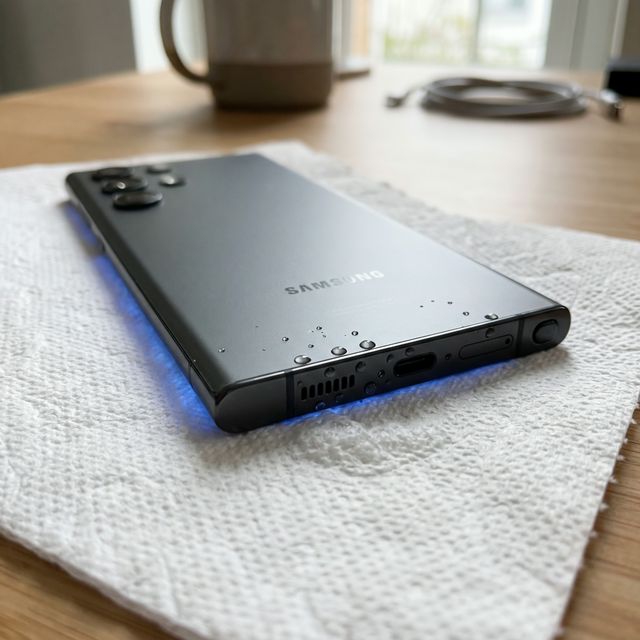
If you’re trying to figure out how to get water out of your Samsung phone speaker, water is trapped in the speaker grille. When water stays in the grille, your Samsung Galaxy phone speaker sounds muffled, distorted, or quiet after getting wet. The fastest fix is to play a 165–230 Hz low-frequency tone through the speaker for 30–60 seconds while holding the phone speaker-side down. Speaker Cleaner’s free web tool does this automatically — no app download needed.
This guide covers Samsung-specific speaker layouts, Galaxy-exclusive features, and model-specific tips for the Galaxy S24, S23, S22, A54, A34, Z Flip, and Z Fold series.
Samsung Speaker Layout — Where Water Gets Trapped
Samsung Galaxy phones have a different speaker configuration than iPhones, and understanding the layout helps you target water removal more effectively.
Galaxy S Series (S22, S23, S24, S25)
The Galaxy S series uses a dual-speaker setup:
- Bottom speaker — The main, louder speaker. Located on the bottom edge next to the USB-C port. This is where water most commonly enters.
- Earpiece speaker — At the top of the display, behind a thin slit in the bezel. Acts as the second stereo channel. Water enters here during rain exposure or face-down splashes.
Tip: When running Speaker Cleaner, run the cleaning cycle twice — once with the bottom edge pointing down, and once flipped with the earpiece pointing down.
Galaxy A Series (A54, A34, A25, A15)
Mid-range Galaxy A phones typically use a single bottom-firing speaker. The speaker grille on A-series phones is often wider but shallower than on S-series models, which means water enters more easily but also ejects more easily.
Galaxy Z Flip and Z Fold
Foldable Samsung phones have unique water challenges:
- Z Flip — The hinge area can trap moisture that slowly migrates to the speaker. After water exposure, unfold the phone fully and run the cleaning tone.
- Z Fold — Has speakers on both halves of the unfolded device. You may need to run the cleaning cycle with each half positioned speaker-down.
Step-by-Step Water Removal for Samsung Phones
1. Use Samsung’s Built-in Water Expulsion (Galaxy Watch Only)
Samsung Galaxy Watches have a built-in “Water Lock” mode that plays a tone to eject water — similar to Apple Watch. However, Samsung Galaxy phones do not have this feature built in. You’ll need an external tool like Speaker Cleaner.
2. Prepare Your Phone
- Unlock your phone and set volume to maximum
- Turn off Dolby Atmos (Settings → Sounds and vibration → Sound quality and effects → Dolby Atmos: OFF). Dolby Atmos processing can interfere with the raw frequency output needed for water ejection.
- Disable Adapt Sound if enabled
3. Run the Water Ejection Tone
- Go to Speaker Cleaner (speakercleaner.com)
- Select “Water Removal” mode
- Hold phone with bottom speaker facing down
- Run for 60 seconds
- Blot the speaker area with a dry cloth
- Flip phone and run again for the earpiece (30 seconds)
4. Test Audio Quality
Play a song you know well at moderate volume. Pay attention to vocal clarity and high-frequency detail (cymbals, hi-hats). If these sound normal, your speakers are clear.
Samsung-Specific Troubleshooting
”Moisture Detected” USB-C Warning
Samsung Galaxy phones display a “Moisture has been detected” or “Check the charger/USB port” notification when liquid contacts the USB-C port sensors. This disables wired charging.
To resolve:
- Power off the phone
- Gently shake with USB-C port facing down
- Leave in a dry, ventilated area for 1–4 hours
- The warning should clear automatically. Do not override it.
If the warning persists after 24 hours with no visible moisture, try: Settings → Apps → Show system apps → USBSettings → Clear cache. Then restart the phone.
Galaxy S Series Known Issues
- S22/S23 bottom speaker cavity — These models have a slightly recessed grille that can trap water more stubbornly. An extra cleaning cycle usually resolves it.
- S24 Ultra earpiece — The earpiece slit is very narrow. Water trapped here may take 2–3 acoustic cycles to fully clear.
Samsung IP Ratings by Model
Understanding your phone’s water resistance rating helps set expectations:
| Model | IP Rating | Fresh Water Depth | Duration |
|---|---|---|---|
| Galaxy S25/S24/S23/S22 | IP68 | 1.5 meters | 30 minutes |
| Galaxy A54/A53 | IP67 | 1 meter | 30 minutes |
| Galaxy A34/A25/A15 | IP67 or None | Varies | Varies |
| Galaxy Z Flip 5/6 | IPX8 | 1.5 meters | 30 minutes |
| Galaxy Z Fold 5/6 | IPX8 | 1.5 meters | 30 minutes |
Important: IP ratings are tested with fresh water only. Pool water(chlorine), ocean water (salt), and soapy water are NOT covered. Speaker grilles are open by design and will trap water regardless of IP rating.
Prevention for Samsung Users
- Disable “Hey Bixby” near water — Active microphone use can draw water into the earpiece
- Use Samsung’s Good Lock Sound Assistant — You can set a maximum volume limiter to prevent accidentally playing audio while the speaker is still wet
- Check One UI’s “Diagnostics” tool — Settings → About phone → Diagnostics → Speaker test. This can confirm whether speaker hardware is functioning after water exposure.
- Keep a Speaker Cleaner shortcut on your home screen — Add speakercleaner.com to your home screen (Chrome → Menu → Add to Home screen) for instant access after splashes.