
Phone Speaker Sounds Muffled? How to Clear Dust & Lint in 60 Seconds
If your phone speaker sounds muffled, dust and lint in the grille are usually to blame. Here's how to fix a muffled phone speaker in 60 seconds with a 165-230 Hz tone.
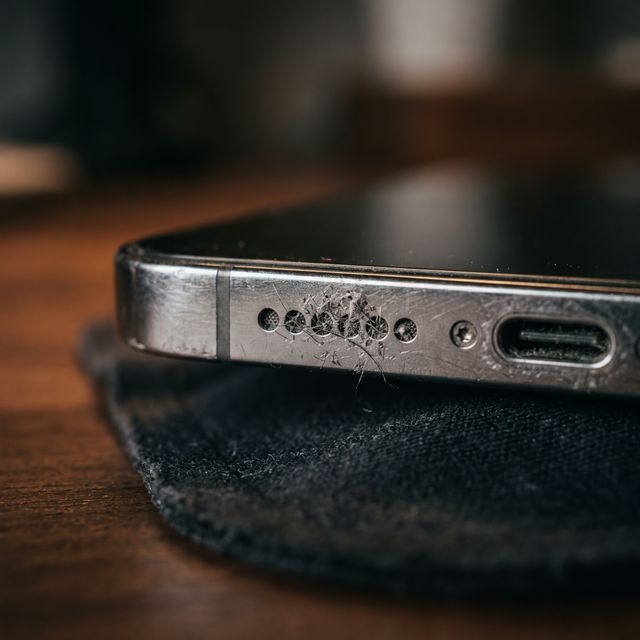
If your phone speaker sounds muffled, pocket lint and dust are almost certainly trapped in the speaker grille. The fix is straightforward: play a low-frequency tone (165–230 Hz) through the speaker for 30–60 seconds with the speaker facing downward. This acoustically pushes the dust out. You can do this right now using Speaker Cleaner — it’s a free online phone speaker cleaner that works directly in your browser.
If you’re searching for how to fix phone speaker problems, how to fix a muffled speaker, or why does my phone sound muffled, this is usually the issue. Here’s why this happens, how to fix it, and what to do if the muffled sound persists.
Why Your Speaker Sounds Muffled (Not Broken)
Your phone’s speaker isn’t damaged — it’s obstructed. When lint enters the speaker grille, it packs tightly into the microscopic holes (typically 0.1–0.3 mm diameter). This dense physical barrier acts as an acoustic low-pass filter, absorbing higher frequencies while letting some low bass end through.
That’s why dirty speakers sound specifically “muffled” rather than silent — you’re hearing a frequency-filtered version of the audio. Think of it like listening to music through a thick blanket. The speaker is still working; the sound just can’t get through the blockage cleanly.
Signs It’s Dust or Lint
Debris in the grille produces very specific symptoms:
- Voices sound distant and unclear on phone calls
- Music loses all treble/high-end — bass is relatively unaffected
- Volume seems reduced by 40–60% even at max setting
- The speaker grille looks gray or white when inspected closely under a light
- You’ve had the phone for over 6 months (it takes time for pocket lint to build up)
If your speaker produces no sound at all, or makes a continuous buzzing/humming regardless of what’s playing, those point to hardware failure rather than a clogged grille.
The 60-Second Fix
What You Need
- A soft-bristled toothbrush (dry)
- Your phone
- Speaker Cleaner web tool (no download required)
Step 1: Preparation (10 seconds)
Turn volume to maximum. Hold phone with speaker grille pointing straight down. Gently run the dry toothbrush over the speaker holes. Do not press hard.
Step 2: Run Acoustic Cleaning (30–60 seconds)
Open Speaker Cleaner and start the cleanup process. This phone speaker cleaner online tool plays a calibrated frequency sweep between 165–230 Hz. At maximum volume, these frequencies create intense acoustic pressure from the inside pushing outwards.
The vibration actively shakes the fine dust particles out of the mesh while the air pressure physically blows the lint away from the diaphragm.
Step 3: Test
Play some music to test clarity. Treble and vocals should sound significantly sharper and brighter.
Step 4: Repeat If Needed
Stubborn, compacted pocket lint combined with sweat can be dense. If it’s still muffled, run another cycle.
Phone-Specific Notes
iPhone Muffled Speaker Dust
The bottom speaker grille on iPhone 12, 13, 14, 15, and 16 models is especially prone to trapping pocket lint because the holes are slightly recessed. If you keep your iPhone in your pants pocket, lint accumulates daily.
Pro tip: iPhones with Face ID have two speaker locations — the bottom grille and the earpiece at the top of the screen. Run the cleaning tone once with the bottom speaker facing down, then flip the phone and run it again to shake dust out of the earpiece.
Samsung Galaxy Speaker Clustered with Dust
Samsung Galaxy S and A series phones often have speaker grilles on both the bottom edge and along the top bezel. The Galaxy S24, S23, and S22 bottom-firing main speakers can gather massive amounts of micro-debris if used on job sites or outdoors.
For Samsung Galaxy phone speakers, external acoustic tools like Speaker Cleaner work perfectly to vibrate embedded dirt out.
Google Pixel Speaker Issues
Pixel phones route audio through the USB-C port area in addition to the traditional speaker grilles. This USB-C port is a magnet for massive lint chunks. If your Pixel sounds muffled, run the cleaning cycle and also gently use a plastic pick to fish any massive lint clumps out of the USB port itself.
Why Just Brushing Isn’t Enough
Common remedies like brushing or using sticky tack can grab the top layer of dust, but they rarely clear the deep particles. Here’s why:
- Brushing can sometimes push the fine dust deeper into the mesh.
- The acoustic method generates localized outward air pressure directly behind the grille interface. It’s essentially using the phone’s own internal hardware to blow the dust outwards, guaranteeing it won’t be pushed further in.
When to Worry
Seek professional repair if:
- Muffled sound persists after 3+ acoustic cleaning cycles and physical brushing has failed
- You used compressed air previously and suspect you blew out the diaphragm
- The speaker produces no sound at all on any app
- Audio is horribly distorted at low volumes, indicating a torn diaphragm
For most everyday scenarios — pocket lint, purse debris, household dust — the acoustic cleaning method resolves the muffled speaker issue quickly and completely.